Target Sourcing

Start from the thesis.
Finish with targets worth pursuing.

Describe the companies you want in plain English. Build the long list, qualify every company against your criteria, and move a tiered set of priority targets, each with a researched case, into your pipeline.
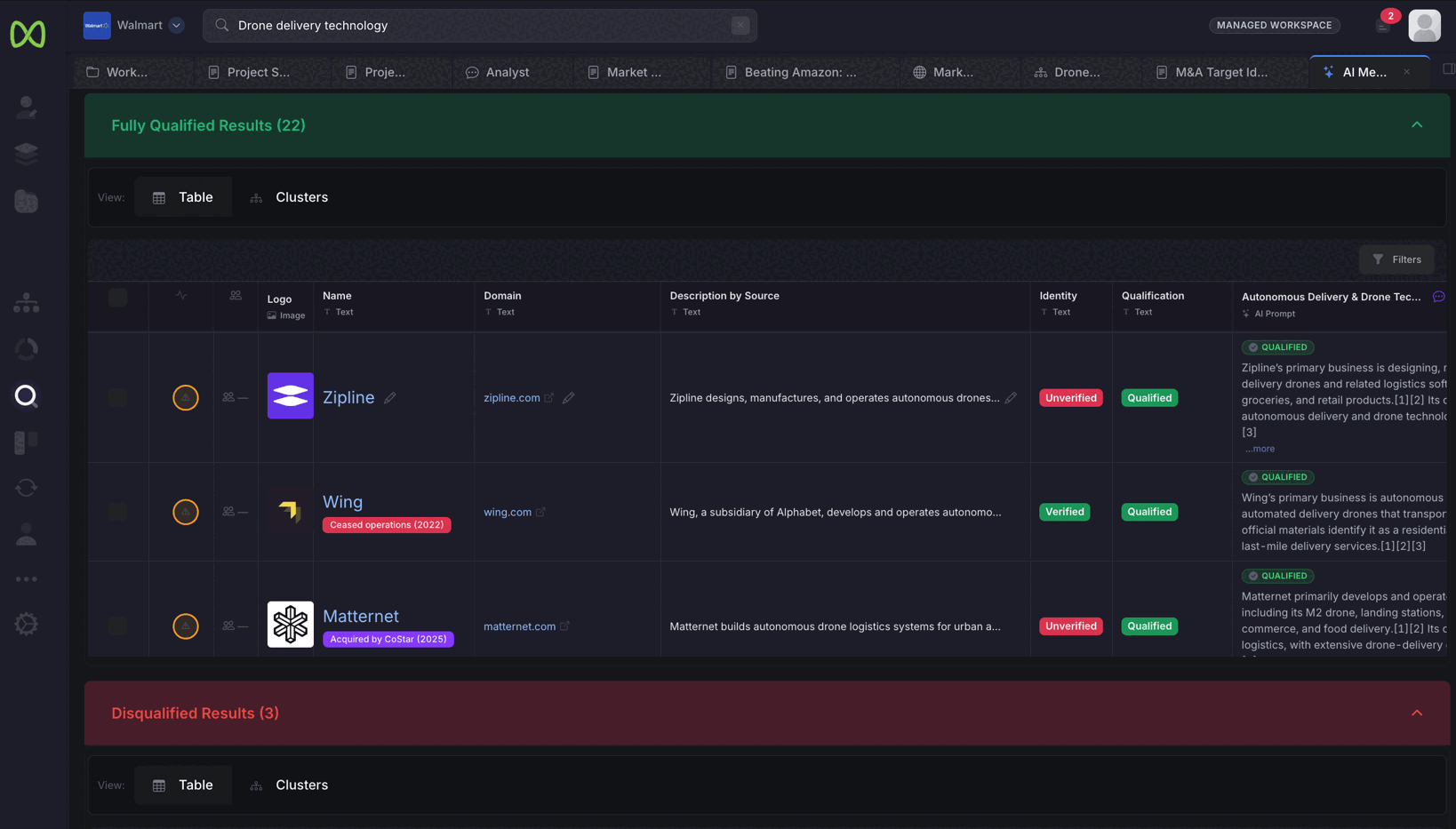
AI Metasearch results for drone delivery technology in a Walmart workspace: 22 fully qualified companies in a table with logo, name, domain, a description by source, a Verified or Unverified identity badge, a Qualified status and an AI column with the reasoning and numbered sources, above 3 disqualified results
Actual product screen · AI Metasearch results, qualified against the thesis with the reasoning and sources shown. Illustrative Walmart case.

AI Metasearch

A long list built from what companies do.

Write the brief the way you would give it to an analyst: the business, the customers, the capability you need. The search works from that description, not from a list of keywords.

Three models, searched in parallel
Your description runs through GPT, Perplexity and Claude at the same time, so the long list does not rest on a single model.
One row per company
Results are de-duplicated by domain. A company that several searches find appears once.
Identities checked
Each company’s identity is checked and marked in the table, so you know which names to confirm before you spend time on them.
Ready for the next cut
The results are saved as a list you can qualify, segment and move into your pipeline.

From long list to priority targets

Every cut comes with a reason.

Why a company qualified, where it sits in the market and why it ranks where it does are all written down, so the shortlist holds up when leadership asks.

Qualify every company against your criteria

Add each criterion as a question in an AI column, such as “Is it still an independent startup?” Every company on the list is researched against every question.
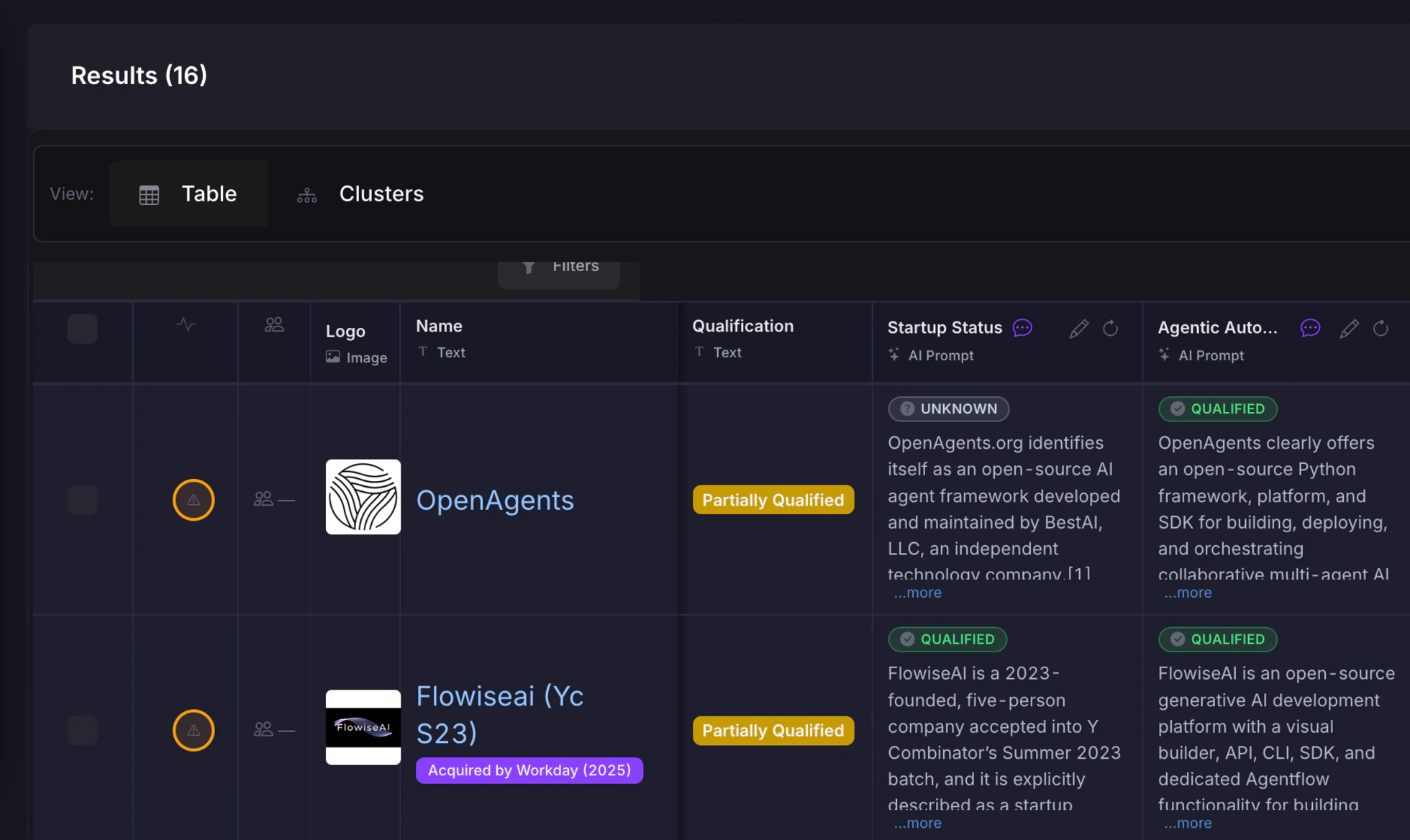
  • One column per criterion, written in plain English
  • An answer for each company, with the reasoning shown under it
  • The same columns work for fit screening and prioritization
A results list of 16 companies with two AI columns, startup status and agentic automation. Each answer is marked Qualified or Unknown with the research reasoning written beneath it, and each company carries an overall Partially Qualified label
Actual product screen · AI columns qualifying the companies from a search.

Segment the universe

See how the market divides before you rank anyone in it. A market map segments the industry and places companies in their segments, so you can see where each candidate competes.
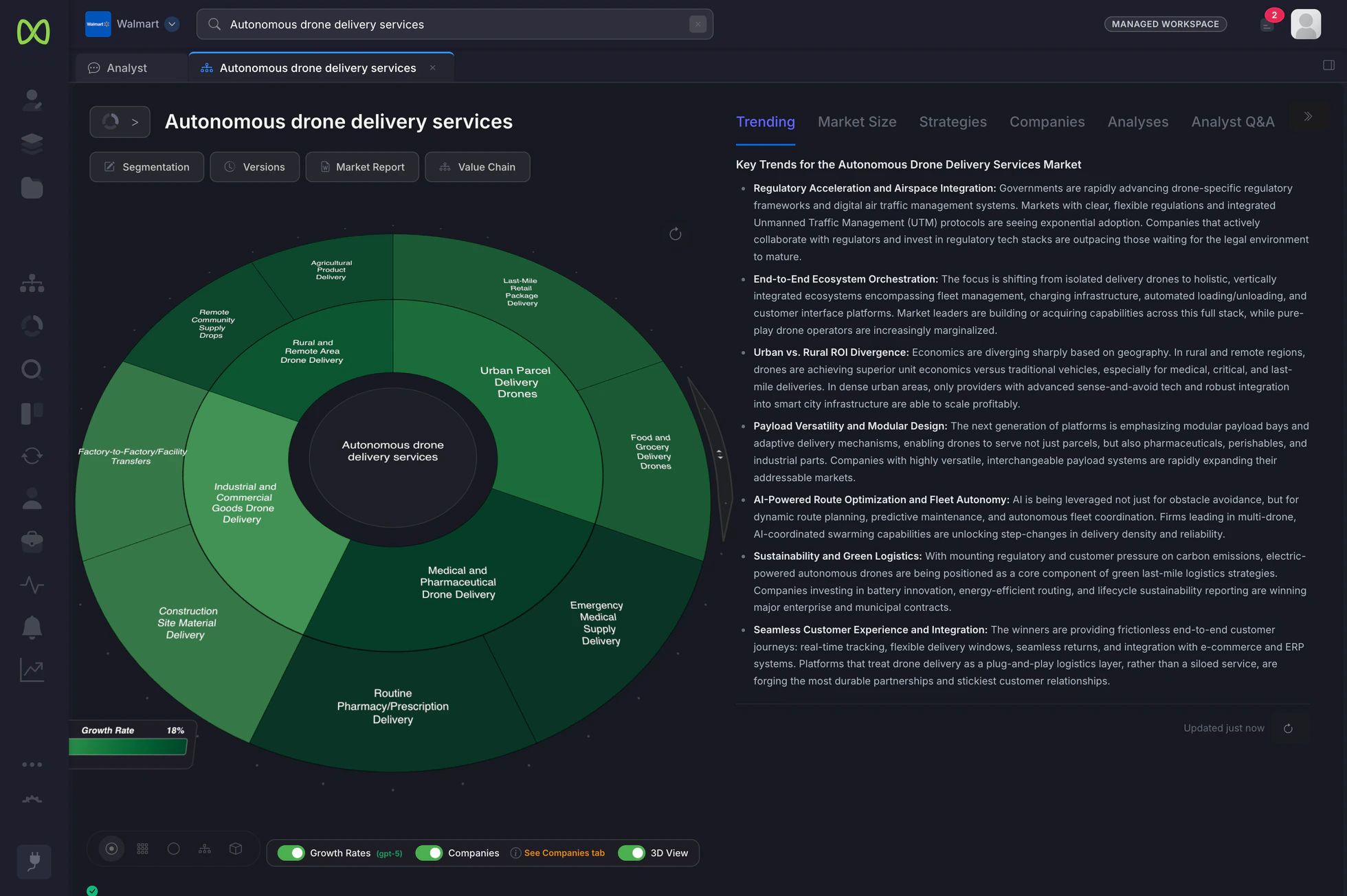
  • Sunburst, treemap and cluster views of the same segmentation
  • Companies placed in the segments they belong to
  • Export the map as a Word report, or place the segmentation in documents and slides
How market maps work →
A market map for autonomous drone delivery services shown as a sunburst, with segments such as urban parcel delivery, medical and pharmaceutical delivery, and rural and remote area delivery, and the key trends for the market written alongside
Actual product screen · a market map segmenting autonomous drone delivery services. Illustrative Walmart case.

Prioritize into tiers

Ask the Analyst to rank the qualified companies against your strategy, from targets to pursue now to technology worth partnering with. The ranking lands in a document your team can edit.
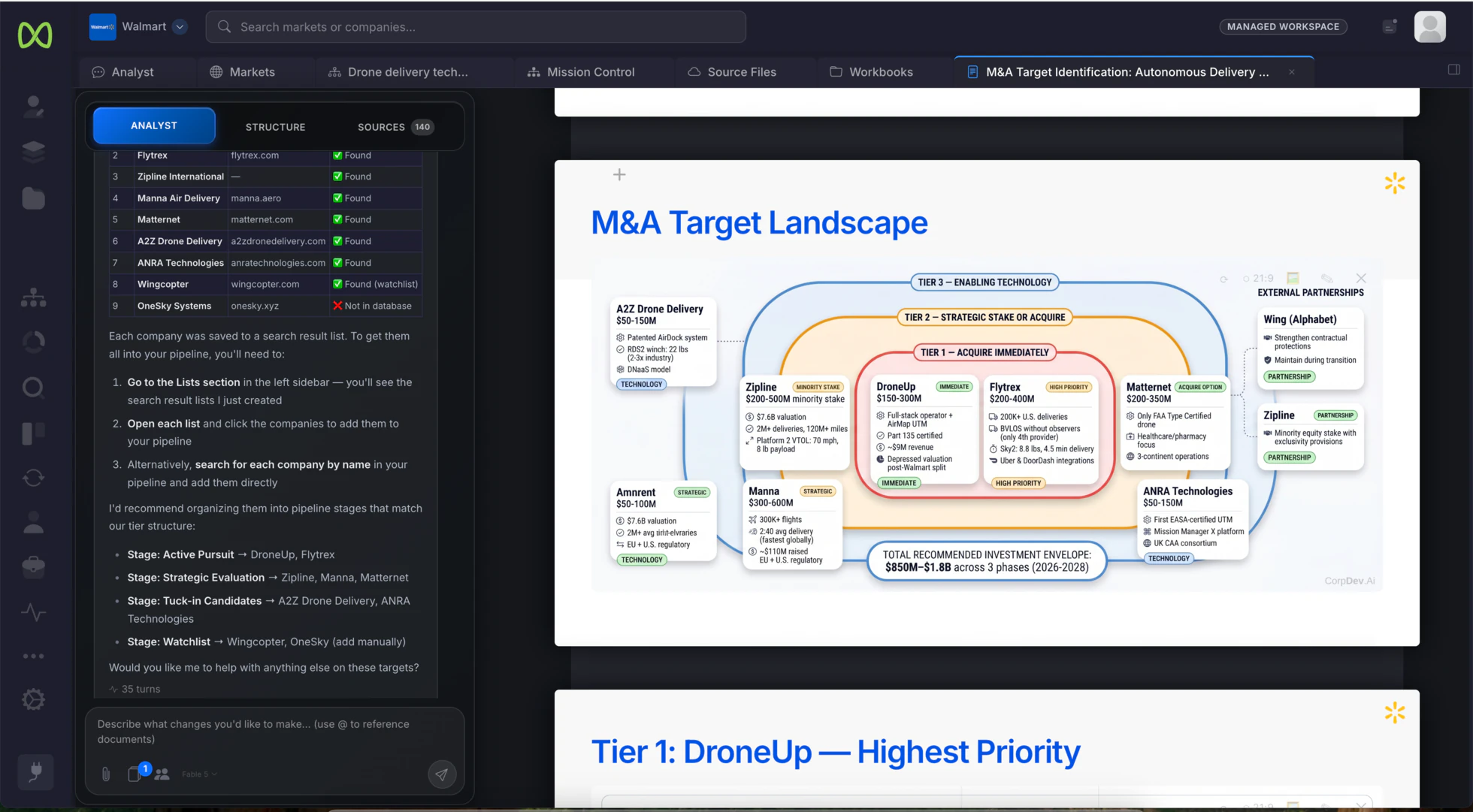
  • A target landscape grouped into tiers
  • The key facts behind each company’s placement
  • Suggested pipeline stages that follow the tiers
An M&A target landscape in a document, with companies grouped into Tier 1 acquire immediately, Tier 2 strategic stake or acquire, and Tier 3 enabling technology. Beside it, the Analyst lists the companies it checked and recommends pipeline stages that match the tiers
Actual product screen · illustrative autonomous-delivery case.

Build the case for each priority target

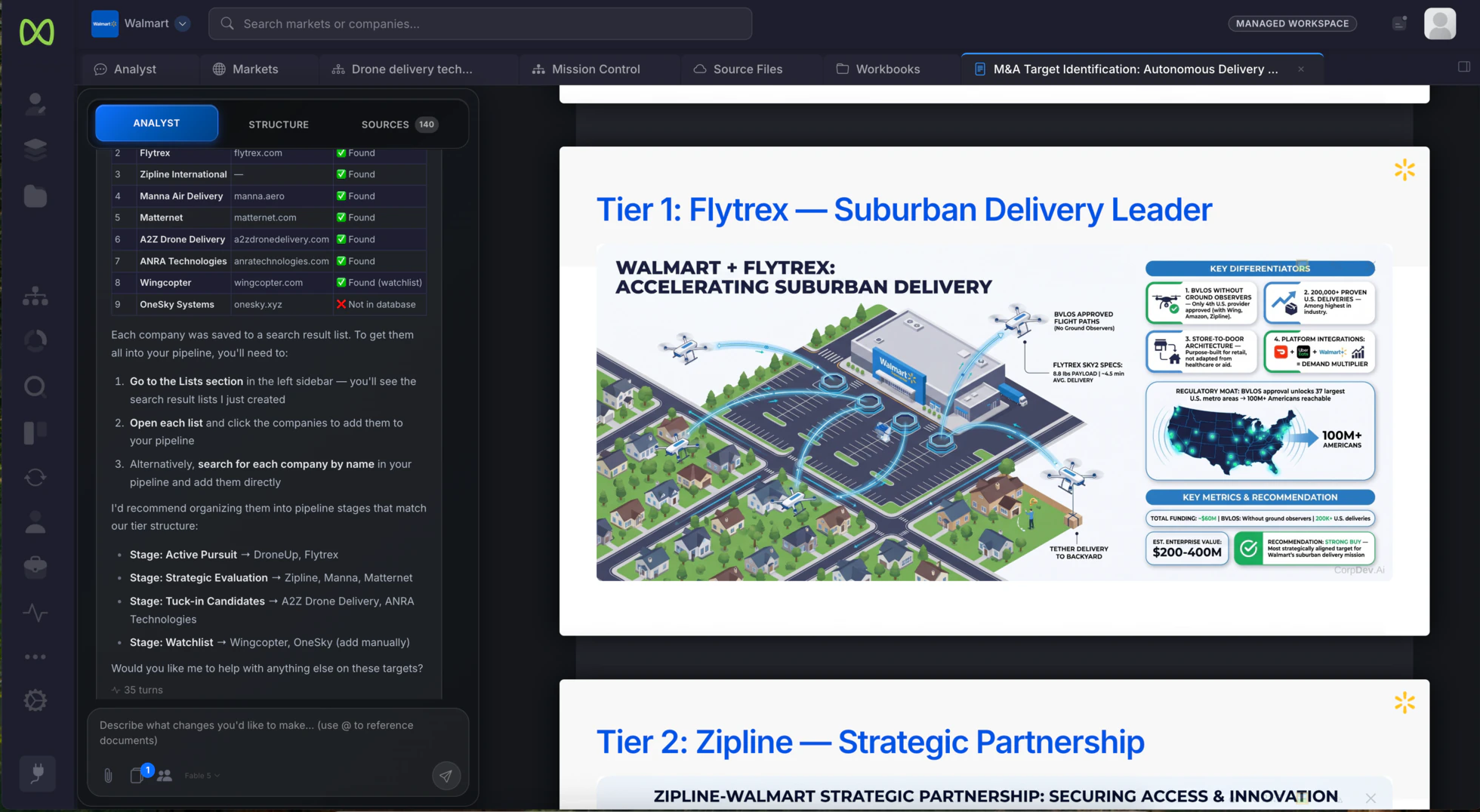
For each top-tier target, the Analyst researches and writes the case: what the company does, why it fits, the key metrics and a recommendation. Numbered citations link each point to its original source.
  • A section per priority target, in the same document as the ranking
  • Numbered sources your team can check
  • Export to PowerPoint, Word or PDF
Go deeper on a single company →
The target identification document open at a Tier 1 section on Flytrex, with an illustration of suburban drone delivery, key differentiators, key metrics and a recommendation, and a Tier 2 section on Zipline starting below. The Analyst panel lists each company it looked up
Actual product screen · a priority target in the illustrative autonomous-delivery case.

Into the pipeline

Move priority targets into your pipeline.

When a target is worth pursuing, add it to your pipeline from search or from the list. The research that put it there stays with it.

Your stages

A kanban pipeline with the stages your team works in, from first look to active pursuit.

Connected cards

Each company card links to its profile, research and documents. The pipeline can carry AI columns of its own.

View access

Share the pipeline with view access for the people who follow progress without editing it.

See pipeline management →

Bring the thesis you are working on.

Run it through AI Metasearch on a trial, or book a demo to see a target search go from a description to a tiered list.